Robots.txt monitoring: get an alert when it changes
How to set up robots.txt monitoring: get an alert with the exact lines that changed, know how fast Google reacts, and what to look for in a robots.txt diff.
 Alexandra SwanCustomer Operations Lead
The short answer
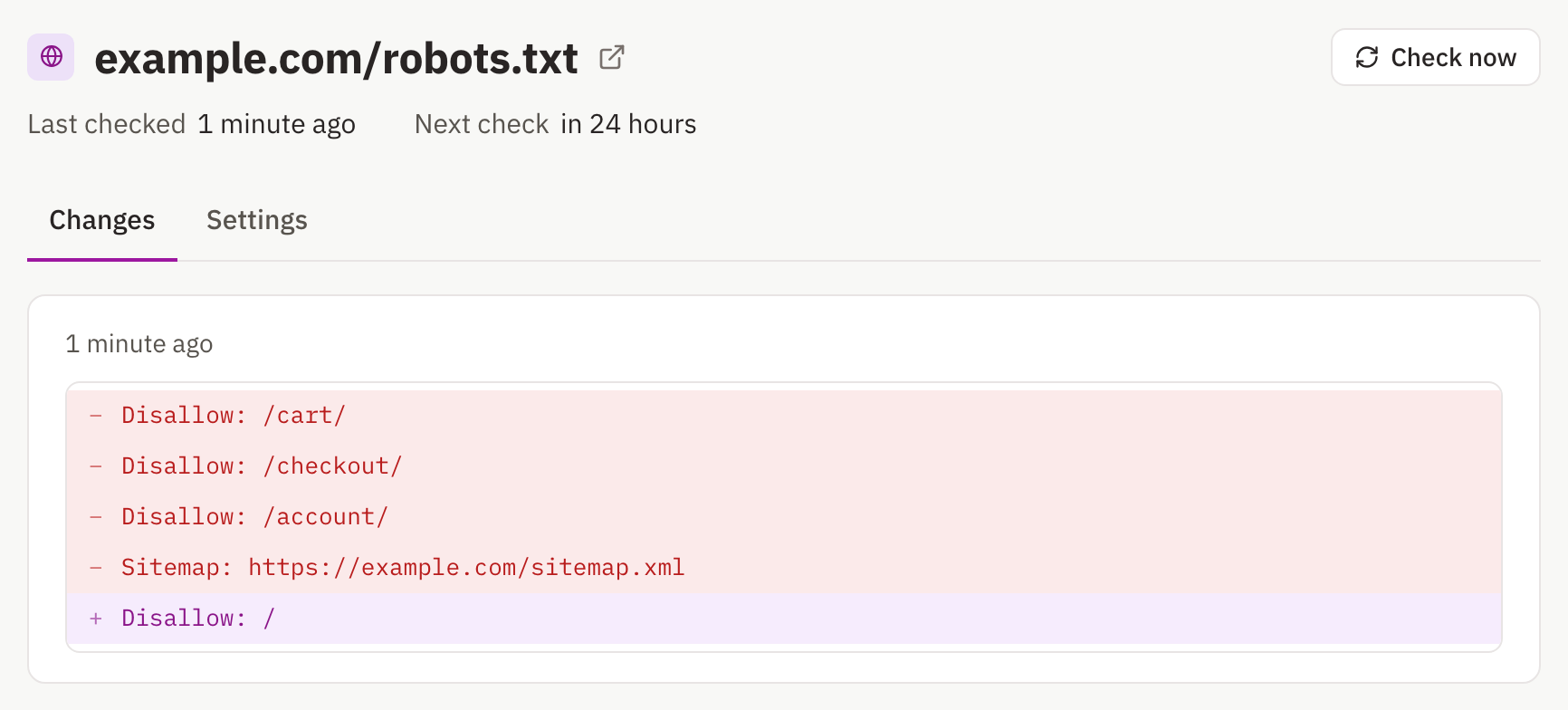
Robots.txt monitoring means checking your robots.txt file on a schedule and getting an alert when its rules change. Add https://yoursite.com/robots.txt to a page monitor as its own page, check it daily (hourly around releases), and send alerts somewhere your SEO and engineering people both read. Each alert shows the exact lines added and removed, so a stray 'Disallow: /' from a staging deploy stands out on the first check after it ships.
Why robots.txt changes deserve an alert
Robots.txt tells crawlers which parts of a site they may fetch, and one wrong line can tell Google to stop crawling everything. It is also the file nobody looks at between releases, which is how bad changes sit there for weeks.
Google reacts on its own schedule, not yours. It caches robots.txt for up to 24 hours, so a bad rule usually takes effect within a day. Errors matter too: if the file returns a server error, Google stops crawling the site for the first 12 hours, then uses the last good version it has for up to 30 days.
Changes do not always come from your own team, either. In a case Glenn Gabe documented for Search Engine Land, a CMS provider added robots.txt directives without the site owner knowing, and important URLs slowly leaked out of Google's index along with rankings and traffic.
How to set up robots.txt monitoring
Robots.txt is a plain-text file, so a page monitor compares it line by line and shows exactly which rule changed.
- Add https://yoursite.com/robots.txt as a page to monitor.
- Leave the rule blank, because every change to this file matters. If your file changes often for harmless reasons, use a rule such as 'alert me when a Disallow or Allow line is added or removed'.
- Check it daily, and hourly in the days around a release.
- Send alerts to email and a shared channel, so whoever is on hand when it fires can act on it.
Monitor every hostname you serve. Robots.txt applies per host and protocol, so www and non-www, each subdomain, and http and https each have their own file, and a change to one says nothing about the others.
A deploy that ships the wrong robots.txt often ships other regressions with it; website defacement and regression monitoring covers watching your key pages after a release.
What to look for in a robots.txt diff
Most changes are routine. These are the ones to read twice:
- Disallow: / under User-agent: *, which asks every crawler to skip the entire site.
- A Disallow that got broader, such as /products/ where it used to be /products/old/.
- A removed Allow line that was carving an exception out of a wider block.
- A Sitemap line removed or pointing somewhere new.
- New User-agent groups that single out specific crawlers, such as AI crawlers.
- Rules Google does not support, like crawl-delay or noindex, which suggest someone expects an effect they will not get.
Two limits are worth knowing while you read. Google ignores anything past the first 500 KiB of the file. And since 1 September 2019, a noindex line in robots.txt does nothing in Google; to keep a page out of results, allow crawling and put the noindex on the page itself, because Google cannot see a noindex on a page it is blocked from crawling.
Check Search Console's robots.txt report too
Search Console's robots.txt report, which replaced the robots.txt Tester in November 2023, shows the robots.txt files Google found for your top 20 hosts, when it last crawled each one, and any warnings or errors. Its Versions view lists the copies Google fetched in the last 30 days, and you can request a recrawl in an emergency, such as right after fixing a bad rule. It is available for domain properties.
The two answer different questions. Search Console tells you what Google fetched and when; a monitor tells you that your file changed, usually before Google's next fetch acts on it.
Monitor competitors' robots.txt files
A competitor's robots.txt is public, and its changes are small but telling. New Disallow lines can reveal sections they are building or hiding, new Sitemap lines can point at new parts of the site, and new User-agent groups show how they treat AI crawlers.
Other files worth monitoring alongside robots.txt
The same setup works for the other plain-text files a site serves at its root:
- /sitemap.xml, where new or vanished URLs show up as added or removed lines. An ignore line such as /^\d{4}-\d{2}-\d{2}/ skips the last-modified dates.
- /llms.txt, if you publish one for AI assistants.
- /ads.txt, which lists the sellers authorised to sell your ad inventory.
- /.well-known/security.txt, the contact details for security reports.
For the tags that live inside your pages, such as noindex and canonicals, see what to track for SEO change monitoring.
Sources
- Google: How Google interprets the robots.txt specification
- Google: A note on unsupported rules in robots.txt (2019)
- Google: Introduction to robots.txt
- Google: Block Search indexing with noindex
- Google Search Console Help: robots.txt report
- Search Engine Land: third-party robots.txt directive changes led to lost SEO traffic (2015)
- Search Engine Land: robots.txt files are handled by subdomain and protocol (2020)
