How to check when a website was last updated, and how far to trust each date
Seven ways to check when a website was last updated, from the Last-Modified header to the Wayback Machine. Only 10 of 35 responding pages sent that header.
 Alexandra SwanCustomer Operations Lead
The short answer
To check when a website was last updated, look for a 'Last updated' date or dateModified in the page source, and compare the Last-Modified header, sitemap lastmod and Wayback Machine captures. Each is a clue: of 35 pages that answered Website Change Tracker's October 2026 test, only 10 sent the header, and 9 of those were under a day old.
The quickest ways to check when a website was last updated
The quickest checks are the page's own date, its Last-Modified header, its sitemap's lastmod, Google's date for the result, the Wayback Machine's captures and the site's feed; a change monitor covers future edits. Each reads a different clue, and each can be wrong in its own way:
| Method | Where to look | What the date really means | How far to trust it |
|---|---|---|---|
| The page's own date or dateModified | The page, or its source (search for 'dateModified') | Whatever the publisher chose to say | Good when it matches the content |
| Last-Modified header | Browser developer tools, Network tab, or curl | When the server says the page changed, often a rebuild or cache refresh | Weak on pages built on request |
| Sitemap lastmod | /sitemap.xml, next to the page's address | When the site says the page changed | Varies by site |
| Google's date and before:/after: | Google search results | Google's estimate of when the page was updated or published | An estimate |
| Wayback Machine captures | web.archive.org | When the Internet Archive captured a copy | Good for 'it changed between these dates' |
| Feeds and the WordPress API | The site's feed (on WordPress, /feed) or /wp-json | Publish date (RSS); last edit (Atom, WordPress) | Good for blogs |
| A change monitor | A tool that saves each version | When a change was first seen | Accurate to your check interval, from the day you start |
Clues from the same site often agree because a single save updates them all. When Wayback captures before and after the page's own date show the change, that date is probably right. If the date matters, as evidence, a citation or a compliance record, save a copy of the page as it is now; how to monitor a website for changes covers keeping a record from here on.
Does the page show its own last updated date?
Often. Articles, policies and help pages commonly print 'Last updated' near the title or at the foot, and Google advises publishers to 'Add a user-visible date to the page and feature it prominently'.
If you can't see a date, open the page source (Ctrl+U, or Command+Option+U in Chrome on a Mac) and search for 'dateModified'. Google's Article markup defines dateModified as 'The date and time the article was most recently modified'. Searching for 'modified_time' finds the Open Graph tag article:modified_time, which ogp.me defines as 'When the article was last changed.'
Ignore the copyright year in the footer. On many sites it updates automatically every January, and Google's sitemap documentation names a copyright date change as an example of a change that is not significant.
How to check the Last-Modified header
Open your browser's developer tools, reload the page, select the first request and read 'last-modified' under its response headers. The Last-Modified header is the server's own statement of when the page last changed. RFC 9110, the standard that defines HTTP (Hypertext Transfer Protocol), calls it 'a timestamp indicating the date and time at which the origin server believes' the page was last modified.
- Press F12, or Command+Option+I on a Mac, to open Chrome's developer tools, and click the Network tab.
- Reload the page and select the first request under the Name column.
- Open the Headers tab and look under Response Headers for 'last-modified'. If it is missing, the server does not say.
From a terminal, curl -sIL followed by the page's address prints the headers of each response, including any redirects; read the last block.
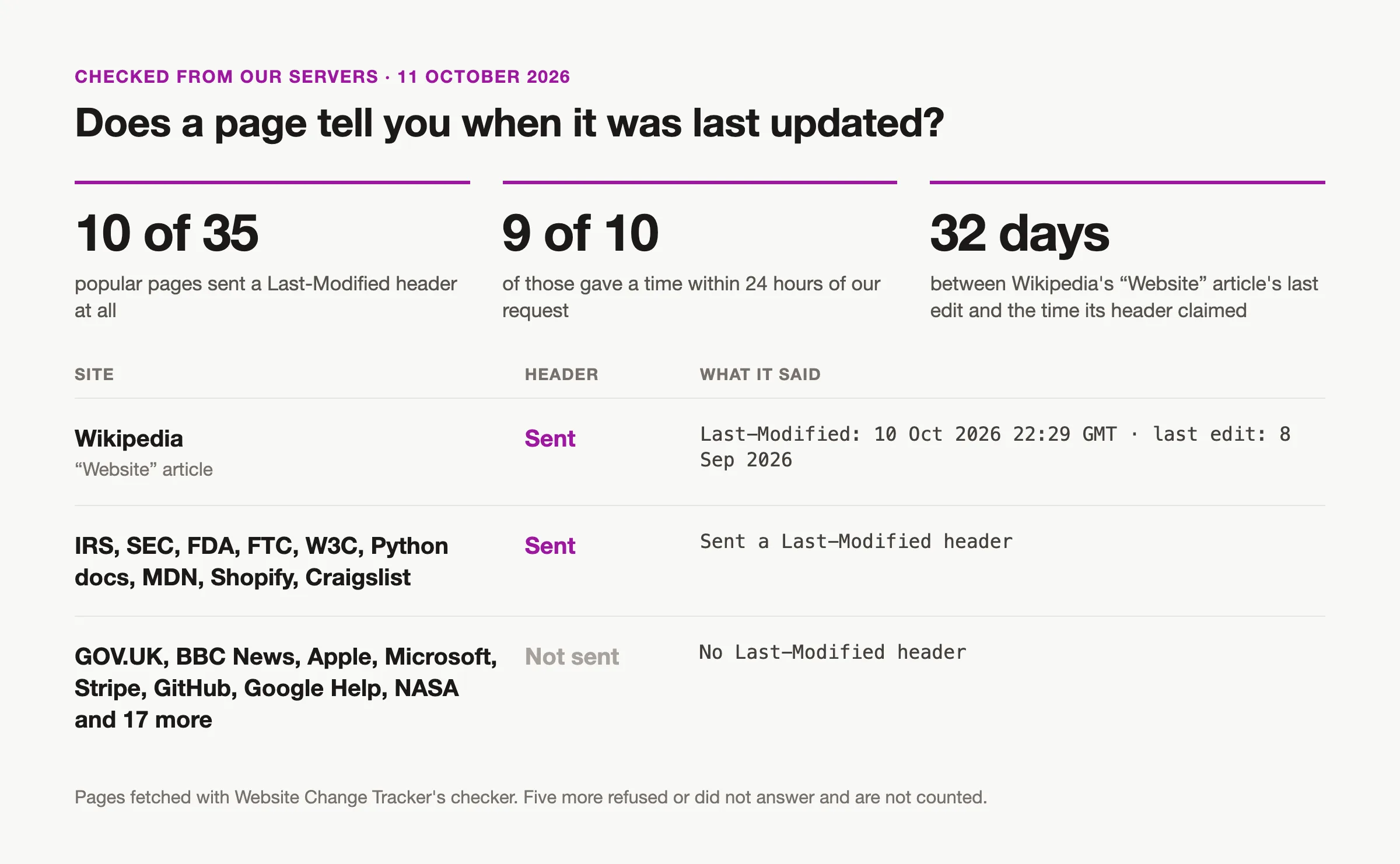
When the header is sent, it is often recent. On 11 October 2026, Website Change Tracker fetched 40 well-known pages from its production servers, from government, documentation, news and company sites to our own; 35 answered. In that test, only 10 sent a Last-Modified header, and 9 of those 10 were less than a day old, which points to a cache refresh or rebuild rather than an edit. Wikipedia's 'Website' article sent a Last-Modified time of 10 October at 22:29 GMT (Greenwich Mean Time), 32 days after its last edit on 8 September. The other 25 pages, ours included, sent no header at all.
RFC 9110 leaves how a server picks the value as 'an implementation detail', so a recent date proves little. Large crawls see the header more often, partly because they count every file: in the HTTP Archive's 2021 Web Almanac, 70.5% of responses used Last-Modified, a figure that includes images, scripts and stylesheets as well as pages.
Why document.lastModified often shows the current time
document.lastModified shows the current time whenever the server sends no Last-Modified header; when the server sends its last rebuild time instead, it shows that recent time. The HTML (HyperText Markup Language) standard says that 'If the last modification date and time are not known, the attribute must return the current date and time', so on most dynamic pages it shows the moment you asked. It also uses your local time zone, while the header is in GMT.
Check the sitemap's lastmod date
A sitemap's lastmod date is the site's own statement of when each page changed. Many sites list their pages in a sitemap at /sitemap.xml, or in a sitemap index linked from /robots.txt that points to several sitemaps, with an optional lastmod beside each address.
The sitemaps.org protocol says the date 'must be set to the date the linked page was last modified, not when the sitemap is generated.' Sites do not always follow it, which is why Google uses lastmod only 'if it's consistently and verifiably (for example by comparing to the last modification of the page) accurate.' If every page on a site carries the same lastmod, it is almost certainly a rebuild time, not an edit date.
Can Google tell you when a page was last updated?
Only as an estimate. The date beside a search result is 'the date that Google estimates that the web page was updated or published', and Google shows one only when it considers it useful.
Google's before: and after: operators narrow results by date. Google's own help page lists them under 'To find documents last updated before a particular date', with examples such as avengers endgame after:2019-03-01 before:2019-03-05. In 2025, Google's Search Liaison said they are 'still in beta', so use them to narrow a search, not to date a page.
Google's own cached copies are gone. The cache link disappeared from results in February 2024, and Google's changelog for 24 September 2024 says 'The cache: search operator no longer works in Google Search.'
How to see old versions of a website on the Wayback Machine
To see old versions of a page, paste its address into web.archive.org and pick a date on the calendar. The Wayback Machine shows when the Internet Archive captured a page, not when the page changed: if two captures differ, the page changed between those dates. The Internet Archive passed one trillion archived web pages in October 2025; well-linked pages often have many captures, while new or little-linked pages may have none.
- Paste the page's address into web.archive.org and open the calendar. A blue date means the capture got a normal page back; green, orange and red mean a redirect, a client error and a server error.
- Open two captures and compare them. The Internet Archive's documentation also describes a Changes view, at web.archive.org/web/changes/ followed by the address, that shows two captures side by side.
- For a list of captures, query the CDX index, the Wayback Machine's machine-readable list of captures: web.archive.org/cdx/search/cdx?url= followed by the address, then &collapse=digest&filter=statuscode:200&fl=timestamp,digest. Each row is a capture whose stored bytes differ from the one before, with its time as YYYYMMDDhhmmss in UTC (Coordinated Universal Time, the same clock as GMT).
On pages with clocks, ads or session tokens, almost every capture differs, so open the captures from two rows to see what actually changed. And the archive only knows what it captured: a page captured twice a year can change many times in between.
Feeds and APIs that carry an update date
Atom feeds and the WordPress REST API record when a post was last edited; an RSS feed records when each item was published. Blogs and news sites often publish one of these:
- RSS (Really Simple Syndication) feeds give each item a pubDate, 'when the item was published', and the feed a lastBuildDate, 'the last time the content of the channel changed'.
- Atom feeds have an updated date, but only for changes the publisher 'considers significant', so 'not all modifications necessarily result in a changed atom:updated value.'
- On WordPress sites with the REST API (application programming interface) open, /wp-json/wp/v2/posts?slug= followed by the post's slug and &_fields=modified_gmt returns that post's last edit, in GMT. Pages use /wp-json/wp/v2/pages the same way.
How to get an RSS feed from a website that doesn't have one covers where feeds hide and how to build one.
Are 'website last updated checker' tools accurate?
Website last updated checkers are only as accurate as the clue they read, and none can see an edit the site never recorded. As of October 2026, SEOmator's guide pointed to its header checker, which reports the Last-Modified header. websiteage.org estimated a site's age from 'indicators of the site age' and called the result 'always an estimation'. Webzy's checker did not say what it read. Checking the header, the sitemap and the Wayback Machine yourself tells you more.
How to know the next time a website is updated
To know the next time a website is updated, monitor the page: a change monitor checks it on a schedule, saves a dated copy of the text when it changes, and emails you the old and new wording. Website Change Tracker does this from $5 a month.
- Create an account and add the page you care about.
- Choose how often to check: daily on Basic, hourly on Starter, every 5 minutes on Pro.
- Optionally add a plain-English rule, such as 'tell me when the pricing table changes', so small edits elsewhere don't alert you.
- Read the dates in the page's history. Each saved version carries the time the change was first seen.
Four limits. A monitor knows nothing about changes before you add the page, so pair it with the Wayback Machine for the past. Our checker reads the page's HTML without running JavaScript and ignores both the page head and the HTTP headers, so it misses text a script adds, dateModified and Last-Modified. It sends no alert when a check fails, and some sites block it: 5 of the 40 pages in our October 2026 test refused or timed out. Basic keeps 7 days of history; Starter and above keep every version.
For more on alerts, see how to get notified when a website is updated and website change alerts.
Sources
- RFC 9110, section 8.8.2: Last-Modified
- MDN: Last-Modified header
- MDN: Document.lastModified
- WHATWG HTML standard: document.lastModified
- Chrome DevTools: Network panel
- curl manual
- Google: Influence your byline dates in Google Search
- Google: Article structured data
- The Open Graph protocol
- Google: Build and submit a sitemap
- Google Search Central blog: sitemaps, lastmod and ping (June 2023)
- sitemaps.org protocol
- Google Search Help: refine web searches (before: and after:)
- Search Engine Journal: Google on time-based search operators (May 2025)
- 9to5Google: Google removes the cached link (February 2024)
- Google Search Central: updates log (cache: operator, September 2024)
- Internet Archive help: using the Wayback Machine
- Internet Archive: Wayback CDX server README
- Internet Archive: comparing snapshots with Wayback Changes
- Internet Archive: one trillion web pages archived (October 2025)
- RSS 2.0 specification
- RFC 4287: the Atom syndication format, atom:updated
- WordPress REST API reference: posts
- HTTP Archive Web Almanac 2021: caching
- SEOmator: how to check when a website was last updated
- websiteage.org
- Webzy: last updated checker
- Wikipedia: Website (the article we checked)
