How to get notified when a website is updated
How to get notified when a website is updated with new posts, events or listings: monitor the page that lists them and set a rule for the ones you want.
 Alexandra SwanCustomer Operations Lead
The short answer
To get notified when a website is updated with something new, monitor the page that lists its newest items, such as the news index, events calendar, notices page or listings page, rather than the homepage. Add a plain-English rule like 'tell me when a new event is posted' so moving timestamps and counters do not set off alerts, and choose where the alert goes. Each alert shows the lines that were added, and the page's history keeps every version.
Find the page that lists new items
Most websites publish new things in one predictable place, even when the homepage is busy with everything else. That listing page, sorted newest first, is the page to monitor. The homepage is usually the wrong choice: it mixes new items with promotions, featured content and navigation that change for their own reasons.
- A news, blog or press page, often at /news or /blog.
- An events calendar or an 'upcoming' page.
- A notices, advisories or announcements page on a government or regulator site.
- A careers page or a job board.
- A 'new arrivals' or listings page on a shop or marketplace.
- A changelog or release notes page for software you depend on.
If the list only shows the latest ten or twenty items, that is fine. A new item pushes the oldest one off the bottom, and the change still shows the new one arriving at the top.
Each check that finds a new item sends a website change alert with the lines that were added.
Set a rule so only new items trigger an alert
A listing page changes for many reasons besides a new item. Timestamps tick from '3 minutes ago' to '5 minutes ago', counters move, items get reordered. Compare the whole page and almost every check looks like a change.
A plain-English rule fixes that. Instead of alerting on any difference, the check reads what changed and alerts only when it matches what you described. A few rules that work well:
- 'tell me when a new session is posted', for an events calendar.
- 'alert me when a new advisory mentions Chicago', for a notices page.
- 'tell me when a new job is posted in London', for a careers page.
- 'tell me when a new product is added', for a new arrivals page.
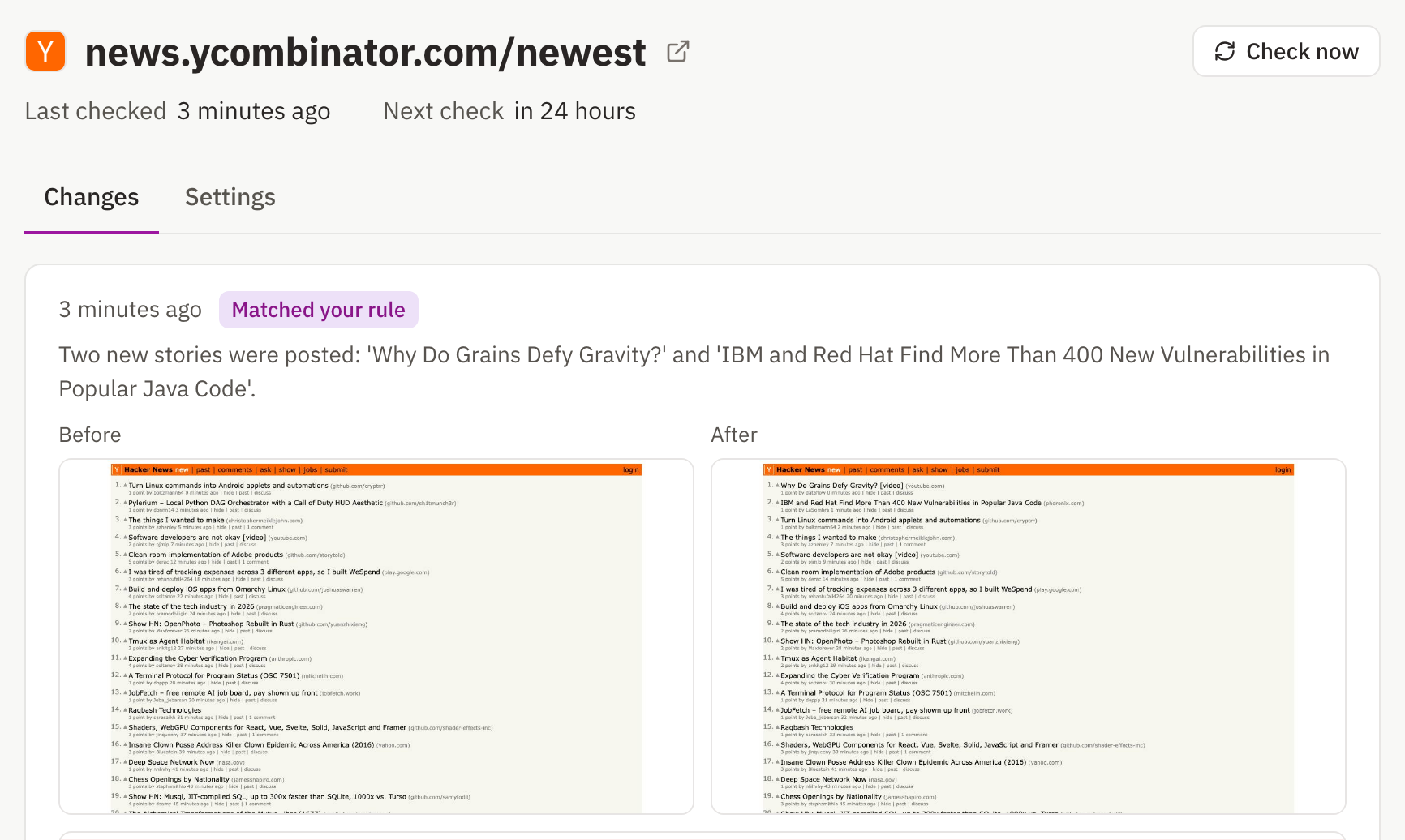
Changes that do not match the rule are still recorded in the page's history, marked as held back with the reason, so you can see the rule doing what you meant before you rely on it.
More ways to keep the noise down are in how to stop false positives in website change monitoring.
How often to check for new items
Pick the interval by how quickly a new item stops being useful to you, not by how often the site posts.
| What gets posted | Check every | Why |
|---|---|---|
| Event places, classes or appointments with limited seats | 5 minutes to hourly | Places go to whoever sees the post first |
| Job postings, tenders and grants | Hourly to daily | Deadlines run for days, so a same-day alert is enough |
| Regulatory notices and policy updates | Daily | You need to know, but the response is measured in days |
| News and blog posts | Daily | One check a day works as a digest of everything published since the last |
On Website Change Tracker, daily checks come with every plan, hourly checks start on Starter, and 5-minute checks on Pro.
When each new item gets its own page
Some sites never update a list. Each new article, product or filing gets its own URL, and the only place they all show up is the site's sitemap, the file that lists every page for search engines.
A sitemap is just another page you can monitor. Point the check at it, usually /sitemap.xml or one of the files it links to, and each new page appears as an added URL in the change. Sitemaps also carry a last-modified date for every page, so add the ignore line /^\d{4}-\d{2}-\d{2}/ to skip those date lines and keep the alerts to new URLs.
Large sites split the sitemap into several files, often one per content type. Pick the one that lists the pages you care about, such as the posts or products sitemap.
Check for a feed or a built-in alert first
Before monitoring anything, look for a way the site already tells people. An RSS feed is the cleanest option where one exists, and many sites have one they do not advertise. Newsletters, follow buttons and the notification settings on platforms like GitHub or YouTube are worth a look too.
Monitoring earns its place when none of those exist, when they cover less than you need, or when you want the alert filtered down to the items you care about.
How to get an RSS feed from a website that doesn't have one covers where hidden feeds live and how to build one when there is none.
Pages a check cannot read
A few kinds of page do not work with this approach, and it is better to know before you set one up.
- Pages behind a login. Checks only read public pages.
- Lists loaded by JavaScript after the page opens. The text a check compares is the page as the server sends it, so items that only appear after scripts run can be missing from the comparison even when they show in the screenshot.
- Infinite scroll feeds and pages personalised for each visitor, which never show everyone the same list.
